Let’s talk
Book a call with our team today!

Semantic HTML and Accessibility for SEO
I want to talk about something that sounds boring but also has the potential to give your SEO a serious boost - and that’s semantic HTML and accessibility.
Now I know it might sound like one of those “tick-box compliance” things - stuff that makes you think, “Cool, we’re being inclusive.” And yeah, it is about making the web accessible for everyone, which you should 100% be doing anyway. But being totally honest, it’s also a sneaky SEO hack, and most people are completely ignoring it.
Here’s why it matters.
Google doesn’t look at your website the way you do. It doesn’t “see” colours, layouts, or pretty fonts. It reads your site more like a screen reader would, and if you’ve never heard of that, it’s the tech that helps people who are blind or visually impaired navigate websites.
So when your site is clean, well-structured, and marked up properly? You’re not just making it easier for screen readers - you’re helping Google actually understand your content. So it’s a win-win.
Proper HTML Structure
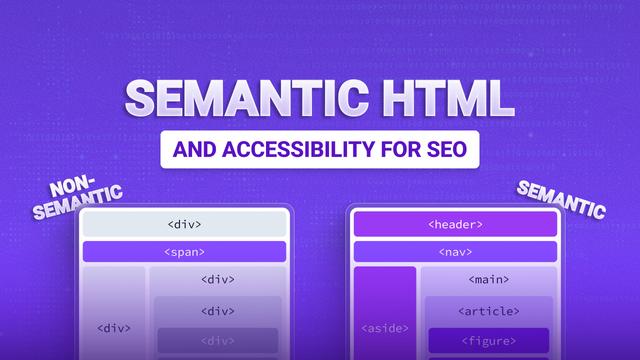
Semantic HTML isn’t complicated - it’s just using the right tags in the right places. For example:
- <header> for your page intro,
- <main> for your actual content,
- <nav> for your menus,
- <article> for blog posts
And you’ll always want to tag headings properly - including one <h1> per page, then <h2>, <h3>, and so on.
This tells Google what’s important, which is great - but also how it should be structured. It’s like giving your content a table of contents for both search engines and screen readers.
Also: use <button> for buttons, not just random <div>s that look like buttons. And use <table> when you’re actually presenting data — not for layout.
ARIA and Accessibility Features
There’s this thing called ARIA (Accessible Rich Internet Applications) , and it’s like extra info you can add to help screen readers understand dynamic content or interactive bits on your page. Super helpful for screen readers… and for Google to figure out what your site actually does.
Add proper alt text to your images too. Not just for SEO, but so everyone can understand what’s there - even if they can’t see it.
Skip navigation links and landmark roles help people (and crawlers) jump straight to the good stuff without getting lost.
Common Semantic Mistakes
Slapping three <h1> tags on one page? That's a big no. You’re confusing Google on what the page is actually about.
Using <div>s or <span>s for everything instead of proper HTML tags? That just makes your site harder to understand and navigate.
If you’re styling content to look like a table without using <table>, that’s just confusing - for users and search engines!
Let’s talk
Book a call with our team today!